Wednesday, 23 February 2022

Some Omber Editions Discontinued


Omber has a lot of different editions available for many different platforms. These editions accumulated over time for various reasons. Unfortunately, some of these editions are being discontinued.

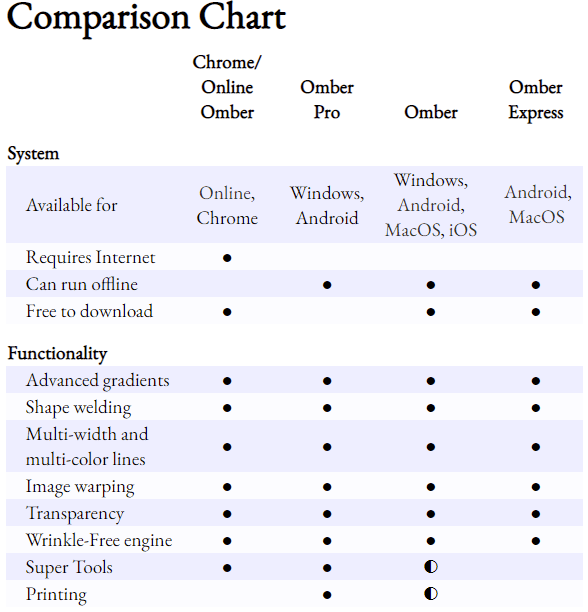
Omber Pro for Windows is being discontinued. The regular Omber for Windows is free, but you can unlock certain premium features for a modest subscription fee. I know some people don't like subscription software, so I also offered Omber Pro, a paid edition with all features permanently unlocked. Unfortunately, Microsoft is no longer allowing me to sell Omber Pro. Omber Pro only ever sold a couple of copies, so Microsoft is removing it from the Windows Store. I want to be able to continue updating it so that those who purchased the software in the past can still get any new features that I add to the regular edition of Omber, but Microsoft is blocking me from updating it as well. 

Omber Express for MacOS is also being discontinued. I originally had two apps: a free Omber for the Mac and a freemium Omber for iOS. Then Apple merged their Mac Store and iOS App Store, and they allowed in-app purchases across iOS and Mac as long as apps had a single entry in the app store. So the free Omber for the Mac became Omber Express, and I made a new freemium regular Omber with editions for iOS and Mac. That way, users who paid to unlock premium features on iOS could also use those premium features on the Mac version as well. I wanted to discontinue Omber Express for the Mac, but it had one feature--customizable keyboard shortcuts--that were a paid feature in the regular version of Omber, so I kept Omber Express in the store for those people who had already started using the earlier edition of Omber and liked having keyboard shortcuts for free. Unfortunately, new users keep downloading Omber Express even though it's no longer updated. All new features are only added to the regular version of Omber. Since Omber doesn't actually make money anyway, I'm simply going to make customizable keyboard shortcuts free in the next release of Omber, and I will then discontinue Omber Express for Mac.

The mess of editions available for Android will stay the same. Originally, I just had a paid edition called Omber. Since the web edition was free, I decided I should also make a free version of Omber for Android called Omber Lite. I eventually enabled enough functionality in the free version, that I decided that most people really should simply use the free version. As such, I renamed the paid version of Omber to Omber Pro. The freemium version of Omber was renamed from Omber Lite to regular Omber. Omber Express for Android is a free version of Omber that doesn't have access to any premium features that's intended for people with Android devices that can't access Google's Play store.


Wednesday, 29 April 2020

Dashed Lines

Omber now has support for dashed lines. I've included a few basic types of dashes that can be chosen from, but it's fairly easy to add more types if you need more. Just let me know.

Saturday, 14 March 2020

Cloud Saves in Omber

Now that Omber works on iPads and Android phones and computers, I've had a few situations where I've wanted to work on a drawing from different places. I've wanted to work on it from my desktop computer at home, review it on my cellphone while on the subway, and play with it on a tablet while at the library. Transferring files between all these devices is a bit of a pain, so I've been looking into better support for saving documents in the cloud for Omber.

Other apps support cloud saves by making their own cloud services that users can subscribe to. That approach does provide a really good and consistent experience, but it locks users into a service, and it's expensive for users. Instead, I've tried to better integrate Omber with the native cloud saving services available on different devices.

Monday, 3 June 2019

Shape Previews


It's always hard to choose which new features should be added to Omber next. Obviously, I want as many people to use Omber as possible, but different features will appeal to different users. Should I improve the quality of the rendering for those who need the highest quality output? Should I add features that are unique to Omber to differentiate Omber from other tools? Should I improve the workflow for traditional vector graphics to make Omber more competitive for traditional vector graphics tasks? Should I add more premium features to give more incentives for people to purchase a subscription to Omber?

One type of user that I worry about is the beginner user. Many users who download Omber uninstall it soon afterwards. I suspect that some of those downloads are fake downloads or users who downloaded the wrong app. Still, I think many beginner users might simply be confused with how to use Omber. Most people aren't familiar with vector drawing apps. I've seen some beginner users try to rub their finger on the screen, trying to "paint" a scene, even though that's not how most vector drawing apps work. These beginner users will obviously become frustrated when nothing works like they expect, and they will uninstall Omber quickly.

To help these new users, I've been thinking about different ways that Omber could introduce them to vector graphics. I already include a basic introduction to vector graphics when Omber is first started, but it's a bit long to read and follow, so I suspect that most people skip it. I considered building an extensive tutorial system that would guide users step by step in how to draw different things in Omber, but those are actually difficult to make. After playing around with some other vector drawing apps, I noticed that some have a slightly different workflow where they constantly show a preview of the shape that you are drawing as you draw it.

This additional feedback seems like it might help show beginner users that vector drawing tools work differently from bitmap painting programs. If users try to rub their fingers on the screen, they will immediately see that they are specifying the outline for a shape instead of painting on a canvas because the shape preview will immediately show the shape being drawn. Users will get an intuitive feel for how vector drawing apps work instead of needing a tutorial explaining the difference.

I was hesitant about implementing it because I was afraid that Omber's rendering engine would be too slow and not robust enough to handle it. But I've done a lot of work on the rendering system, and it seems like it might handle it. It also required a revamp of the undo system, and lots of tweaks to the workflow. I myself am still getting used to the new new workflow with previews, and it's a tad less responsive than the old version without previews, but hopefully it will provide a gentler introduction to beginner users about the world of vector graphics.

Tuesday, 28 May 2019

Research Paper at Graphics Interface 2019

During the last few months, I haven't been releasing any features for Omber, and I apologize. I've been busy preparing a research paper describing some of the underlying technology behind Omber's advanced gradient system. This paper will be published at the Graphics Interface 2019 conference. I've named the technology DiffusionMesh for the research, but it's the same technology that you get to use in Omber. You might even recognize some of Omber's clipart in the example images. If you're interested, check out the paper and supplementary video. I've also made a video of the presentation I will be giving at the conference, and I will post it here once I've finished editing it together.

Update: The presentation video is now available.

Thursday, 4 October 2018

Performance Improvements for Omber

Omber's performance has always been slower than other vector drawing tools because

  • it can run in a web browser, and web browser code is slower than other code
  • it uses a custom graphics engine that I've written from scratch. Although this engine has support for Omber's gradients, it lacks many of the optimizations that are in older, more developed vector graphics engines
  • I've focused on adding features instead of on performance

This hasn't really been a problem for my uses because Omber defaults to a low quality mode that is fast enough to work with, and I can turn on the high quality HQ mode when I want a final image. I occasionally hire artists to give feedback about Omber, and I've been worried that they are initially confused by the low quality of Omber's default rendering. When they do find the HQ mode, they then tend to leave it on or they tend to regularly switch it on and off, meaning they experience sluggish performance when working.

This has worried me for a while, so I've decided to focus on improving Omber's performance enough that it can default to being in HQ mode. Below is a simulated animation of the different performance enhancements that I've made:


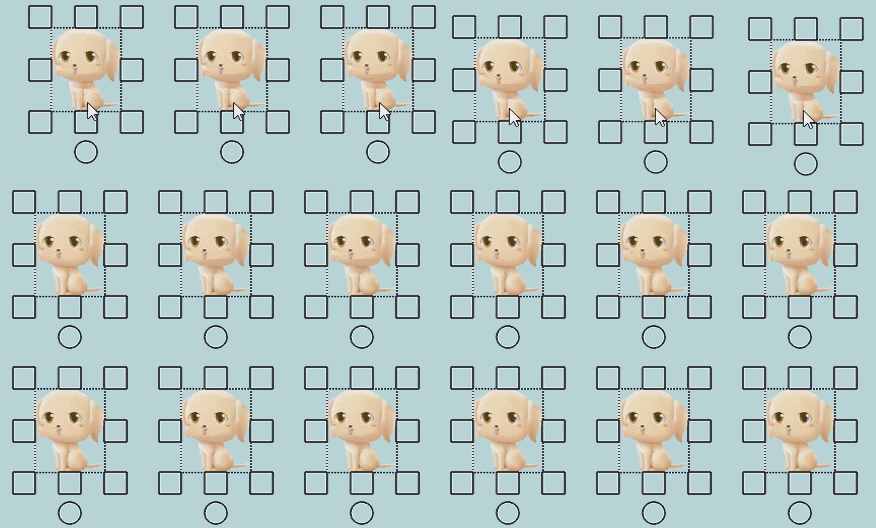
On the right is the original Omber. When you move a shape, it takes a while to draw, so it feels jerky and unresponsive. I spent a lot of time fixing up the performance of the initial drawing of shapes, so that Omber is responsive during shape manipulation. The middle animation demonstrates the effect of these performance improvements.

Omber also has a separate gradient generation stage that works in the background to generate gradients after you manipulate shapes. Since this runs in the background, it doesn't affect the responsiveness of Omber, so it usually isn't performance critical. Unfortunately, in HQ mode, the shapes that Omber has to deal with are more complicated, and the gradient generation started to become too slow for complex drawings. In the middle animation, you can see that after the shape has finished moving, it takes a while for the gradients to be calculated.

So I'm now working on improving gradient generation speed, so that Omber will behave like in the left animation, where it's responsive when you move a shape, and then the gradient quickly fills in afterwards.

The key to all these performance improvements is a new feature added to web browsers called Web Assembly. The existing Omber code has already been heavily optimized in the past. Unfortunately, in the past, web browsers could only run code written in JavaScript, and there are limitations to how fast those web browsers can run that code. WebAssembly lets browsers run code written in C++. This opens up many new possibilities for performance enhancements. C++ gives programmers more control over memory layouts, data types, and memory allocation. This makes it possible to rewrite key pieces of Omber code to make use of this extra control. For example, many of Omber's algorithms need to process thousands of points and triangles. With C++, these points and triangles can be stored compactly in arrays, which can be accessed more quickly and take less memory. Putting things in arrays also provides an arbitrary and implicit ordering on objects, providing a means to sort these objects. Supplementary information about these objects can be stored in arrays instead of dictionaries. Traditionally, the main problems with C++ is that it's hard to write and it's prone to security problems. I'm dealing the coding difficulties by focusing my efforts on only the small sections of code in Omber that take the most time. WebAssembly eliminates most security problems with C++ by adding extra security checks throughout the code.

As I've rewritten the slow parts of Omber in C++, I've also discovered a few coding mistakes that have reduced performance that I've eliminated. For example, I added some special code for handling some edge cases in the Edge web browser. Unfortunately, this resulted in mouse events being processed twice, halving performance.

These performance improvements will be released in the next week or two. After this round of optimizations, I think there are only limited means available for further speed-ups, such as taking advantage of increased parallelism (not really possible in web browsers) and algorithmic improvements (I have a few ideas in mind here, but those changes would require extensive new research).