Friday, 25 February 2022

Omber in Other Languages

I think it's important to translate programs into many different languages. That makes it easier for people in different countries to learn and use these programs. Unfortunately, it hasn't been practical to translate Omber to other languages. 

The first problem is cost. Translating programs cost money. When I've translated websites to other languages in the past, it hasn't really increased the number of users much, so translating Omber wouldn't really be able to recoup the cost of the translations. 

The next problem is time. It takes a huge programming effort to prepare an app for translation. Translating Omber is particularly hard. Other apps just use a bunch of abstract icons for their user interface. I can never understand what the icons in other apps mean, so I designed Omber to have text for all of its icons. It also has many help screens and a tutorial system. These help screens make use of many diagrams and animations, which would also need to have different versions made for different languages. Preparing all the text in all of these different places to be translated would be a huge effort.

Then, there is the issue of software evolution. When I have the time, I go in and tinker on Omber and try to add new features. Every time a new button or screen is added to the program, these new elements have to be translated. Hiring out a bunch of translators to translate a few words of text is a real hassle. On job contracting websites, translators would end up spending more time bidding for the translation work than on actually doing the translation. All this hassle would make me less able to add new features to Omber, and many of these new features would not end up being properly translated to other languages.

Finally, there are compliance issues. When an app is translated into other languages, you are considered as trying to sell to countries where those languages are spoken. With European countries in particular, you are expected to comply with the laws of those countries when you try to sell things to those countries. Omber is just a small app, and I don't have the time to study the law regarding apps in all those countries to ensure that the app is legal with regards to privacy and other restrictions, so it's easier to just keep the app in English and say that I'm not trying to sell my app to those countries.

These are the main reasons that have prevented me from translating Omber to other languages. I have always wanted to translate Omber to other languages, but it just hasn't been practical. 

I started rethinking my stand last year. Omber started getting a lot of users from Saudi Arabia for some reason. It looked like it was just a temporary spike. It seemed like it might just be some schools using the app temporarily for remote learning when students can't get to computer labs (since Omber is available for free on so many platforms, it's great for this purpose) and that usage would die down later. Still, I felt guilty because the app didn't even support Arabic text. What's the point of learning a drawing app if you can't use it for making posters and other art in your own language? It's possible that Omber was only being used in English schools, but it still made me feel bad. Fortunately, I had been studying how to add support for complex scripts like Arabic to Omber for many years, so I was able to add that feature in quickly (though it has taken an additional year to fully flesh out and stabilize support for it).

The number of users from Saudi Arabia eventually went down, as expected, and I didn't think about it much again. But at the start of this year, the number of users from Saudi Arabia went up again. This caused me to think about how all those users were making an effort to use an app despite the fact that it was in English while I wasn't making even a little effort to make the app more suitable for them. So I decided to investigate if I could meet the app's non-English users halfway somehow. This is what I'm doing:

  1. Translating the app won't recoup the cost of the translations, but I'll still try translating to a couple of languages where there are a significant number of Omber users. Setting up the tools for the translation will take a significant effort, but I'll hopefully be able to reuse those tools for other projects
  2. The app will continue to be an English app with an English app listing. Some of the buttons for basic functionality will be translated though. Help screens, diagrams, dialog boxes, etc. will remain in English. So the final app will be a mix of English and some other languages.
  3. Google has made a translation service available through its Play Console where app developers can submit small translation jobs of even only a few words. I'm not sure about the quality of the translations. The translation service notably doesn't even have a way to submit translation notes to help guide translators on how certain words should be translated. But this translation service seems like it will work well with how Omber is developed even if the translation quality isn't great
  4. Omber has so few users that I doubt anyone cares if I'm not entirely compliant with European regulations, but just to be safe, I will only target languages used in non-European regions like Quebec and Saudi Arabia.
So over the next few days or weeks, Omber will hopefully be available with some partial translations on several platforms. It will likely take a while to stabilize and tweak all the layouts for the different languages, particularly regarding RTL issues, but I'm hoping these initial steps will make Omber easier to use even if they're imperfect.

Wednesday, 23 February 2022

Some Omber Editions Discontinued


Omber has a lot of different editions available for many different platforms. These editions accumulated over time for various reasons. Unfortunately, some of these editions are being discontinued.

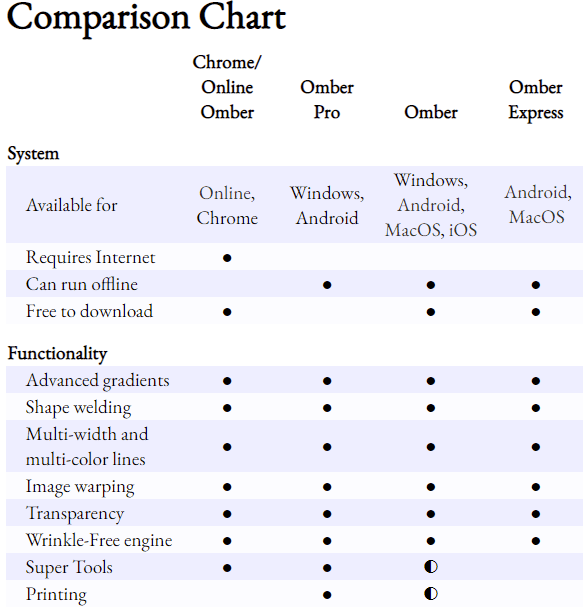
Omber Pro for Windows is being discontinued. The regular Omber for Windows is free, but you can unlock certain premium features for a modest subscription fee. I know some people don't like subscription software, so I also offered Omber Pro, a paid edition with all features permanently unlocked. Unfortunately, Microsoft is no longer allowing me to sell Omber Pro. Omber Pro only ever sold a couple of copies, so Microsoft is removing it from the Windows Store. I want to be able to continue updating it so that those who purchased the software in the past can still get any new features that I add to the regular edition of Omber, but Microsoft is blocking me from updating it as well. 

Omber Express for MacOS is also being discontinued. I originally had two apps: a free Omber for the Mac and a freemium Omber for iOS. Then Apple merged their Mac Store and iOS App Store, and they allowed in-app purchases across iOS and Mac as long as apps had a single entry in the app store. So the free Omber for the Mac became Omber Express, and I made a new freemium regular Omber with editions for iOS and Mac. That way, users who paid to unlock premium features on iOS could also use those premium features on the Mac version as well. I wanted to discontinue Omber Express for the Mac, but it had one feature--customizable keyboard shortcuts--that were a paid feature in the regular version of Omber, so I kept Omber Express in the store for those people who had already started using the earlier edition of Omber and liked having keyboard shortcuts for free. Unfortunately, new users keep downloading Omber Express even though it's no longer updated. All new features are only added to the regular version of Omber. Since Omber doesn't actually make money anyway, I'm simply going to make customizable keyboard shortcuts free in the next release of Omber, and I will then discontinue Omber Express for Mac.

The mess of editions available for Android will stay the same. Originally, I just had a paid edition called Omber. Since the web edition was free, I decided I should also make a free version of Omber for Android called Omber Lite. I eventually enabled enough functionality in the free version, that I decided that most people really should simply use the free version. As such, I renamed the paid version of Omber to Omber Pro. The freemium version of Omber was renamed from Omber Lite to regular Omber. Omber Express for Android is a free version of Omber that doesn't have access to any premium features that's intended for people with Android devices that can't access Google's Play store.

Wednesday, 29 April 2020

Dashed Lines

Omber now has support for dashed lines. I've included a few basic types of dashes that can be chosen from, but it's fairly easy to add more types if you need more. Just let me know.

Saturday, 14 March 2020

Cloud Saves in Omber

Now that Omber works on iPads and Android phones and computers, I've had a few situations where I've wanted to work on a drawing from different places. I've wanted to work on it from my desktop computer at home, review it on my cellphone while on the subway, and play with it on a tablet while at the library. Transferring files between all these devices is a bit of a pain, so I've been looking into better support for saving documents in the cloud for Omber.

Other apps support cloud saves by making their own cloud services that users can subscribe to. That approach does provide a really good and consistent experience, but it locks users into a service, and it's expensive for users. Instead, I've tried to better integrate Omber with the native cloud saving services available on different devices.

Monday, 3 June 2019

Shape Previews


It's always hard to choose which new features should be added to Omber next. Obviously, I want as many people to use Omber as possible, but different features will appeal to different users. Should I improve the quality of the rendering for those who need the highest quality output? Should I add features that are unique to Omber to differentiate Omber from other tools? Should I improve the workflow for traditional vector graphics to make Omber more competitive for traditional vector graphics tasks? Should I add more premium features to give more incentives for people to purchase a subscription to Omber?

One type of user that I worry about is the beginner user. Many users who download Omber uninstall it soon afterwards. I suspect that some of those downloads are fake downloads or users who downloaded the wrong app. Still, I think many beginner users might simply be confused with how to use Omber. Most people aren't familiar with vector drawing apps. I've seen some beginner users try to rub their finger on the screen, trying to "paint" a scene, even though that's not how most vector drawing apps work. These beginner users will obviously become frustrated when nothing works like they expect, and they will uninstall Omber quickly.

To help these new users, I've been thinking about different ways that Omber could introduce them to vector graphics. I already include a basic introduction to vector graphics when Omber is first started, but it's a bit long to read and follow, so I suspect that most people skip it. I considered building an extensive tutorial system that would guide users step by step in how to draw different things in Omber, but those are actually difficult to make. After playing around with some other vector drawing apps, I noticed that some have a slightly different workflow where they constantly show a preview of the shape that you are drawing as you draw it.

This additional feedback seems like it might help show beginner users that vector drawing tools work differently from bitmap painting programs. If users try to rub their fingers on the screen, they will immediately see that they are specifying the outline for a shape instead of painting on a canvas because the shape preview will immediately show the shape being drawn. Users will get an intuitive feel for how vector drawing apps work instead of needing a tutorial explaining the difference.

I was hesitant about implementing it because I was afraid that Omber's rendering engine would be too slow and not robust enough to handle it. But I've done a lot of work on the rendering system, and it seems like it might handle it. It also required a revamp of the undo system, and lots of tweaks to the workflow. I myself am still getting used to the new new workflow with previews, and it's a tad less responsive than the old version without previews, but hopefully it will provide a gentler introduction to beginner users about the world of vector graphics.

Tuesday, 28 May 2019

Research Paper at Graphics Interface 2019

During the last few months, I haven't been releasing any features for Omber, and I apologize. I've been busy preparing a research paper describing some of the underlying technology behind Omber's advanced gradient system. This paper will be published at the Graphics Interface 2019 conference. I've named the technology DiffusionMesh for the research, but it's the same technology that you get to use in Omber. You might even recognize some of Omber's clipart in the example images. If you're interested, check out the paper and supplementary video. I've also made a video of the presentation I will be giving at the conference, and I will post it here once I've finished editing it together.

Update: The presentation video is now available.

Thursday, 4 October 2018

Performance Improvements for Omber

Omber's performance has always been slower than other vector drawing tools because

  • it can run in a web browser, and web browser code is slower than other code
  • it uses a custom graphics engine that I've written from scratch. Although this engine has support for Omber's gradients, it lacks many of the optimizations that are in older, more developed vector graphics engines
  • I've focused on adding features instead of on performance

This hasn't really been a problem for my uses because Omber defaults to a low quality mode that is fast enough to work with, and I can turn on the high quality HQ mode when I want a final image. I occasionally hire artists to give feedback about Omber, and I've been worried that they are initially confused by the low quality of Omber's default rendering. When they do find the HQ mode, they then tend to leave it on or they tend to regularly switch it on and off, meaning they experience sluggish performance when working.

This has worried me for a while, so I've decided to focus on improving Omber's performance enough that it can default to being in HQ mode. Below is a simulated animation of the different performance enhancements that I've made:


On the right is the original Omber. When you move a shape, it takes a while to draw, so it feels jerky and unresponsive. I spent a lot of time fixing up the performance of the initial drawing of shapes, so that Omber is responsive during shape manipulation. The middle animation demonstrates the effect of these performance improvements.

Omber also has a separate gradient generation stage that works in the background to generate gradients after you manipulate shapes. Since this runs in the background, it doesn't affect the responsiveness of Omber, so it usually isn't performance critical. Unfortunately, in HQ mode, the shapes that Omber has to deal with are more complicated, and the gradient generation started to become too slow for complex drawings. In the middle animation, you can see that after the shape has finished moving, it takes a while for the gradients to be calculated.

So I'm now working on improving gradient generation speed, so that Omber will behave like in the left animation, where it's responsive when you move a shape, and then the gradient quickly fills in afterwards.

The key to all these performance improvements is a new feature added to web browsers called Web Assembly. The existing Omber code has already been heavily optimized in the past. Unfortunately, in the past, web browsers could only run code written in JavaScript, and there are limitations to how fast those web browsers can run that code. WebAssembly lets browsers run code written in C++. This opens up many new possibilities for performance enhancements. C++ gives programmers more control over memory layouts, data types, and memory allocation. This makes it possible to rewrite key pieces of Omber code to make use of this extra control. For example, many of Omber's algorithms need to process thousands of points and triangles. With C++, these points and triangles can be stored compactly in arrays, which can be accessed more quickly and take less memory. Putting things in arrays also provides an arbitrary and implicit ordering on objects, providing a means to sort these objects. Supplementary information about these objects can be stored in arrays instead of dictionaries. Traditionally, the main problems with C++ is that it's hard to write and it's prone to security problems. I'm dealing the coding difficulties by focusing my efforts on only the small sections of code in Omber that take the most time. WebAssembly eliminates most security problems with C++ by adding extra security checks throughout the code.

As I've rewritten the slow parts of Omber in C++, I've also discovered a few coding mistakes that have reduced performance that I've eliminated. For example, I added some special code for handling some edge cases in the Edge web browser. Unfortunately, this resulted in mouse events being processed twice, halving performance.

These performance improvements will be released in the next week or two. After this round of optimizations, I think there are only limited means available for further speed-ups, such as taking advantage of increased parallelism (not really possible in web browsers) and algorithmic improvements (I have a few ideas in mind here, but those changes would require extensive new research).

Thursday, 23 August 2018

Game Engine Import for Omber


One of my long-term goals for Omber is to develop vector graphics tooling for animation and games. That's why the Omber gradient engine is based on a 3d graphics pipeline typical for games instead of a more typical vector graphics pipeline. Omber has supported COLLADA and glTF export for a while because I've always wanted Omber's art to be usable in games.

Unfortunately, support for COLLADA and glTF is pretty rudimentary in most game engines. The situation is not improving either. The new glTF 3d format is one of the best 3d file standards that's been created in decades. It is the first 3d file format standard with the technical capabilities needed for sharing modern 3d models between programs. But most 3d tools have been very reluctant to add support for it. So even though Omber has been able to export its vector art for use in games, no game engines have been able to actually import this vector art.

So I took some time out from working on Omber to create some importer plugins for the game engines PIXI.js (which is also used by RPG Maker MV) and Unity. You don't have to wait around for game engines to catch up to importing modern 3d file formats. You can import Omber vector art immediately into these game engines using the importer plugins with a minimum of hassle. I even game jammed with Omber's PIXI plugin to make sure everything worked, and it was fine. The vector art exported by Omber tends to be heavy in triangles currently, which can be graphics intensive if you have hundreds of pieces of vector art on-screen at the same time, but it's fine for more normal situations. I also used the Unity plugin to make an animation from one of Omber's clipart pieces. Basically, I broke down the chibi boy image into parts and exported each one separately. After importing them into Unity, I reassembled them hierarchically so that the the legs, arms, and heads would be children of the torso object, etc. Then, I could use Unity's animation tools to make a simple run animation. If you want support for other game engines, just send me a message and I'll see what I can do.

I'm now back to working directly on Omber again. I'm not sure which areas I should focus on next. I could add in more general vector design functionality. Although Omber has some unique features, it will take a while for it to be competitive in the general graphic design space. Even then, it would be hard to compete with better resourced firms. I was thinking of making an iPad port, but now that Affinity Designer is out and Vectornator has been made free, I'm not sure there's much of a market there. Ports are also time-consuming and other versions of Omber won't see any improvements when I'm doing the port. Oddly enough, three years ago, I made a rudimentary animation tool in a few months called Animation Companion, and even now, that tool often has more traffic and more users than Omber. I could use some of Omber's technology to make a much better animation tool, something comparable to Spine and that could also handle vector art exported by Omber. I wonder if that would be a better area to focus on.

Wednesday, 11 April 2018

Initial Text Support in Omber

I obviously use Omber for all my vector drawing needs. There's been a couple of times where I've had to make some graphics with some text in it though, and I had to use another tool because Omber didn't support text. I've also noticed that a lot of designers use vector drawing tools for making UI mock-ups, which also requires text support. So I decided to add some basic text support to Omber.

I was a bit torn about implementing it. A long time ago, when I was an intern at Sonic Foundry, one piece of advice they often gave was that if you can't implement a feature in an outstanding way, then don't bother implementing it. Reviewers and other users will see that one mediocre piece of the whole application, and instead of seeing it as a useful, free addition to the program for cost-conscious users who can't afford to buy another program just for that functionality, they'll instead seize on it as a weakness of the application that makes it inferior to others. This is especially true with Omber. Omber is a vector drawing tool for making drawings with advanced gradients and subtle shading. There are other vector drawing tools that are better for general purpose vector drawing tasks. If you need to make art with crazy gradients, then Omber is the better tool by far. I would argue that it even rivals tools like Illustrator. By adding text support, I would be making Omber look more like a conventional general purpose vector drawing tool, and users might get confused and think that it's worse than other programs when it's actually just used for different purposes. Would it be better for me to double-down, forget the text, and spend my time making the gradient support even stronger? In the end, I became annoyed that there are apps that are more popular than Omber but which are far worse than Omber at general purpose vector drawing tasks except that they support text, so I decided to spend some time implementing text to see what would happen.

It took me about a month and a half to implement very basic text support in Omber. Text support is a little strange in that it can be very quick and easy to implement or very long and hard to implement depending on what features you eventually want your text support to have. For example, if you only want to support English text in a text box and if you don't care if text is rendered slightly differently on different platforms, then you can just use the existing text input widgets and text drawing code to quickly implement support for that. Proper support for international text might involve huge lookup tables that would be too hard to download for a web app and custom text editing code while proper support for text transformations and kerning likely requires a custom font rendering engine.

In the end, I wanted to have the most flexibility in the underlying engine as possible, so I opted to do all the font rendering and display in Omber. This means that text in Omber will initially have fewer features and be rendered with lower quality than in other programs, but it will have consistent font rendering across platforms and the power to eventually have more interesting text effects. Right now, font rendering at small sizes isn't great, and very, very thin fonts don't quite render correctly, but with a custom font engine, I have a lot of knobs I can turn to improve things over time.

One surprisingly time-consuming aspect of doing your own font rendering is actually in font enumeration: finding out what fonts are on a system. Different platforms have different ways of listing their fonts and getting at font data, and often the documentation on them often isn't great or they use some ancient legacy approach to categorizing fonts that's really complicated. In many cases, the font information provided by the operating system isn't very good, so you have to open the font file yourself and read out extra information about the font directly. Then there's Android which doesn't even provide a way to find out what fonts are on a phone, so you just have to search around the filesystem for font files.

So in the end, I do have basic text support working in Omber. You can make some drawings with some simple text in them! Right now, I'm trying to figure out what to work on next: adding more features to the text support, better support for non-Western languages, improving the workflow for gradients some more, printing support, or something else entirely.

Wednesday, 7 February 2018

Wrinkle-Free Engine Preview for Omber

I've made some good progress on the new Wrinkle-Free gradient engine for Omber. There's still a lot more work to do, and it will take several months to stabilize it and to get rid of all the bugs. The results are so good, though, that I've decided to release a preview of the Wrinkle-Free engine in the latest version of Omber. The new engine can be enabled from the Options menu.

I'm a little embarrassed to say that I've always been a little unhappy with the images created in Omber. Although Omber was still a great improvement over other vector drawing tools, I've always been reluctant to evangelize it really hard. Every time I looked at images rendered in the old engine, all I could see were the minor visual artifacts at the seams between shapes. But no more! With the new Wrinkle-Free engine, those artifacts are gone, and I can whole-heartedly say that Omber is amazing and that everyone should use it.

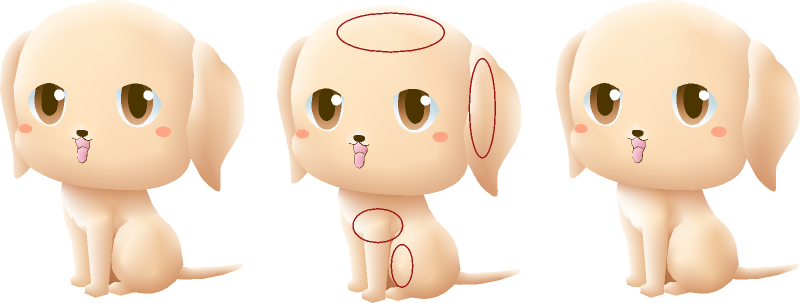
Below is one of the old clipart images in Omber. By default, the shape segments in the drawing are not welded together. The Wrinkle-Free engine only comes into play for welded segments, so, by default, the drawing will be rendered with the old engine. The dog on the left is rendered with the old engine. There are subtle visual artifacts in the image that I've circled in red on the center dog. If you look in those places on the left dog, you'll see some strange lines or creases in the rendered image. In the right dog, I've welded the shapes together where the visual artifacts occurred. This allows the Wrinkle-Free engine to do its job. If you look in the same problem areas, you won't see any of those line artifacts. They've been all smoothed out by the Wrinkle-Free engine.


I'll be taking a small break from the Wrinkle-Free engine and working on other aspects of Omber for the next month. I may have to finally figure out how to get people to actually use Omber and how to monetize it.

Monday, 20 November 2017

Progress on the Wrinkle-Free Engine

I've had another busy month working on Omber. I know some users have wanted better tutorials showing how to get the most of out Omber, so I sponsored the creation of a new tutorial at Envato Tuts+, which should come out in the next couple of weeks. The tutorial writer pointed out some improvements that would make Omber easier to use, so I went and implemented those. I actually had all of those issues plus many more on my To Do list already, but I have workarounds for those problems when I use the software myself, so I never prioritized fixing them. It's good to have feedback from real users about what sort of improvements they need for their workflows because as the designer of the software, it's easy for me to be blinded about what's difficult to use for normal people.

The main things I've been working on though, is the new Wrinkle-Free gradient engine for Omber. This is the engine that does the actual shading and blending of colors across a shape. There's still a lot of work to go, but I now have an early version of the engine running. The new Wrinkle-Free engine uses a new mathematical model of how to blend colors that takes into account the psychology of how users perceive "smoothness."  It's endlessly complicated, but the new Wrinkle-Free engine should be able to make gradients that seem much smoother and easier to control than before.


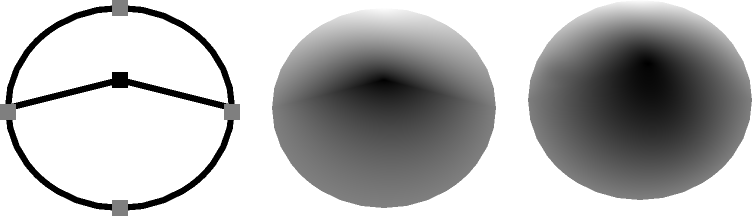
The picture above is from Omber's Wrinkle-Free engine, and it shows the benefits that the Wrinkle-Free engine is able to bring. On the left, are the shapes that are being drawn. It is a circle that is split in half. The outside edge of the circle is a light grey, while the middle point of the circle is black. The middle picture shows how the current version of Omber will shade the shape. Although the shading is smooth, you can still sort of see the line where the circle is divided in half. On the right is the shading done by the new Wrinkle-Free engine. The Wrinkle-Free engine smudges the black color in the middle much further out from the center of the circle, making a smoother-looking gradient.

The old engine was already very complicated, but the new Wrinkle-Free engine is even more complex, so it might still be a while before it stabilizes enough that I'll be able to release it. The early results are so good that I'm really looking forward to getting it out there for you.


Thursday, 26 October 2017

Omber Adds glTF 2.0 Export


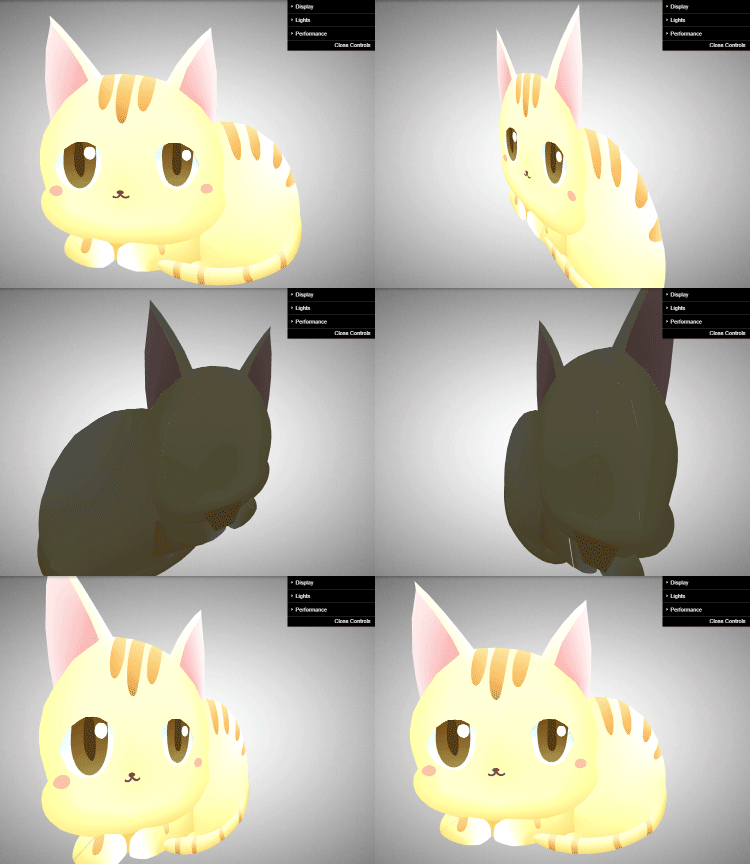
I wasn't planning on adding support for another file format for Omber, but I was so impressed with the new glTF 2.0 file format that I couldn't help myself. glTF 2.0 is a new format for 3d graphics. In the picture above, you can see an Omber drawing that I've imported into a web-based gltf viewer using the glTF format. Being able to export to glTF means that it's possible to export Omber data in a vector format to game engines or into 3d animation tools. For example, if you wanted to show a SVG drawing in a game but with no loss of detail on screens of different sizes, you could use Omber to convert the SVG drawing into a triangle mesh for the game using the glTF format. Although support for the glTF format isn't widespread yet, when glTF support is added to various 3d animation tools, it will be possible to take your Omber drawings and animated them using those tools.

I had previously added support for COLLADA export specifically for handling these use cases, but unfortunately, the support for importing COLLADA files in other programs was very unreliable and inconsistent, so it was never 100% certain whether the data exported by Omber would be imported fully by other programs. glTF is a much more straight-forward and well-specified format, so the glTF files created by Omber should import much more easily in other programs when glTF support becomes more widespread.

Tuesday, 12 September 2017

Introducing...Super Tools


Sometimes, you just need a specialized tool for a niche task. These tools can be incredibly powerful or really simple. The tool might do something that only that one tool can do, or you might be able to achieve the same effect without the tool if you're willing to spend hours of extra work. Sometimes, you can export things to another program that has the necessary functionality, or sometimes not. But when you need a specialized tool for your art workflow, then you really need it.

It's always hard to know where to stick these tools in a program. It's confusing to have a jumble of miscellaneous tools floating around the interface. How often do you actually need to use the "spiral" tool or "star" tool that's available in other programs? Do you really want to clutter up a clean interface with them? Some of these tools are very niche, but for those rare tasks that need them, they're real life-savers.

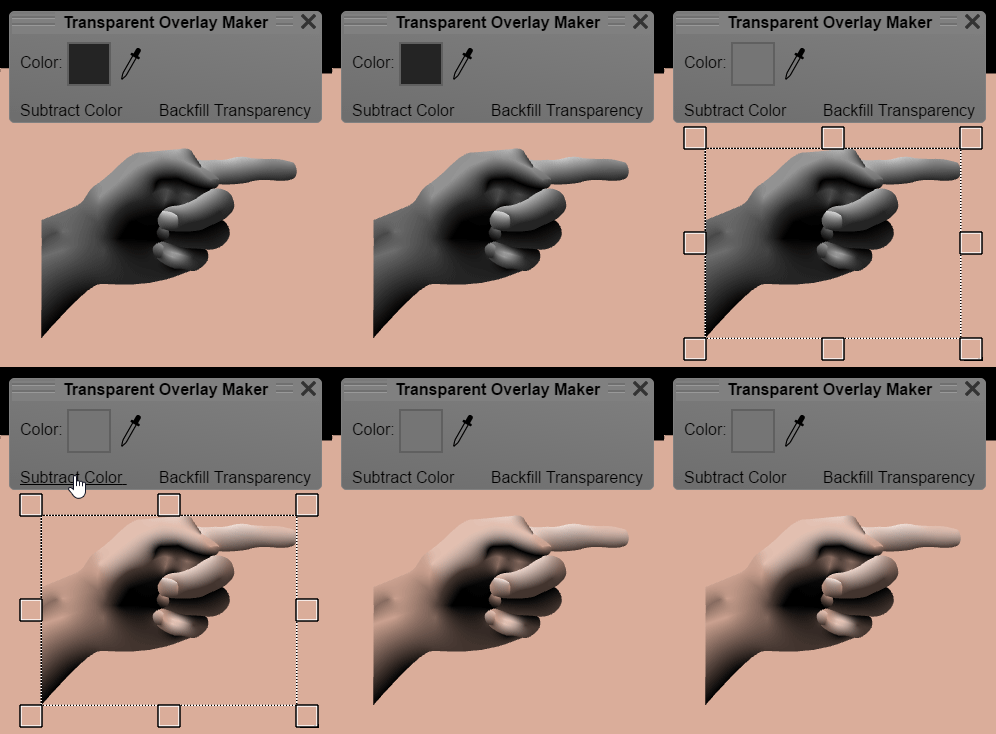
For this reason, I've created the new "Super Tools" feature to Omber. Basically, it'll be a place where I can stick some obscure, but potentially really useful, tools for use in Omber. It will be accessible from the "Options" menu. Currently, there are two tools: a posterization tool called the "Image Palette Reducer" and a tool for creating transparency called the "Transparent Overlay Maker." I believe these Super Tools will be really useful in creating gradient drawings. Above, you can see an animation of the Transparent Overlay Maker in action. I start with a black and white drawing of a hand that I made. Then, I subtract out the grey color from the drawing. That converts all the grey parts to be transparent, allowing the underlying pink color of the background to show through.

Hopefully, I'll be able to add new Super Tools to Omber in the future. Feel free to make suggestions for possible future Super Tools!

Thursday, 17 August 2017

What's Coming Next for Omber

Now that Omber has been released for the Mac, I have the time to add more features to Omber again. Currently, I'm working on lots of small bug fixes workflow improvements to the program. I've been working on lots of big, time-consuming features over the past year. While doing those big changes, I've often noticed little things that could be improved. I've always filed them away as things to work on later when I have more time. I recently hired some designers to do some testing on Omber, and they found these minor issues to be a bit problematic too. Like, I'm aware of them. I do use Omber myself. I do encounter these annoyances myself. But I have to trade-off spending time polishing Omber to have a smoother workflow or working on new features that can unlock new domains where Omber can be used. Given that there are vector design apps that have such horrible workflow that they are barely usable yet they are still very popular and widely downloaded, I've usually opted to work on new features. But I think Omber is now sufficiently powerful and useful that I can take a small pause to go in and try to fix a bunch of these minor issues.

After that, I'm still undecided as to what to work on next. There are three major features that I think would be worth exploring:

1. Support for Text and Shapes with Holes

Although Omber is a very powerful vector design tool, it is intended primarily for making drawings with soft shading and advanced gradients. To be useful for general vector design tasks though, Omber would need to have support for text, dashed lines, and shapes with holes in them. Support for these features are needed for making diagrams. Should I spend time on making Omber better at being a jack of all trades, or should I focus more on what makes Omber different from other general purpose drawing programs?

2. New Rendering Engine

Although Omber's gradients are incredibly powerful, when you put several gradients side-by-side, the resulting gradient is sometimes not as smooth as you expect it to be. It's possible for an artist to manually fix this up by adding in some more intermediate shapes to control how the gradient spreads, but it's difficult to explain and a little tricky to do. I'm thinking of creating a new rendering engine called the Wrinkle-Free engine that should fix this problem. It will require a rewrite of how major portions of the internals of how Omber works. It will also require some risky cutting edge research. Currently, Omber rides right on the limit of what scientists know about how to make gradients on computers. The extra-smooth gradients produced by the Wrinkle-Free engine will require the invention of new approaches.

3. Vector Asset Importer

Although Omber can be used to create infinitely scalable vector art, there aren't any file formats for actually storing and displaying the types of vector art that Omber is capable of creating. So if you want to display your Omber drawings on a web page, you either have to convert it to a bitmap like PNG, or you must use an inferior vector file format like SVG or PDF that can't recreate Omber's gradients. I could write some code that people could put on their web pages to allow people to use Omber drawings in them. I could also write similar code for mobile apps, so that instead of needing to include heavy hi-res bitmaps in the app, they could just include some lighter-weight Omber vector files, and then use the Omber code to decode them when the app is run.

Friday, 11 August 2017

Where's the Mac Version of Omber?

Short answer:
I will release it to the Mac App Store on Monday, August 14.

Long answer:
I sent the Mac version of Omber off for review on Sunday, and it was accepted on Monday. That was a lot faster than I expected. I thought the review process would take a few days and that I might need a few passes to get it through. In fact, the review process was so fast that it threw off my scheduling. I was expecting to use the time it was in review to work on a backlog of related tasks and to prepare for the release. Instead, I've had to rush the release preparations.

I've delayed the release for a week so that I can update the website and do some PR. This new Mac version is a major new undertaking for Omber, and I want people to know about it. It's weird. Even though I'm the creator of Omber, I still find myself instinctively reaching for CorelDraw when I want to edit some SVG icons. When I catch myself and use Omber instead, even I'm surprised by how well it works. I keep thinking to myself, "this program is so awesome, and it's free. Why aren't more people using it?" So I'm going to make a real effort to spread the word about Omber this time.

I'm really eager to let people get their hands on the Mac version of Omber. I know that Mac people are very picky about their user interfaces, so I put a lot of effort into integrating Omber into the Mac ecosystem. It makes use of Cocoa's document framework, so you get all the proper file menus and edit menus and saving and whatnot. I made an effort to "Macify" the drawing UI by using a Mac-like color scheme and moving all the close buttons to the upper-left of windows. I admit that the UI still exhibits a "house-style" rather than true "Apple-style." I'm a big believer of the old-school UI approach of trying to make interfaces readable and self-describing. As a result, the UI will seem more functional rather than artful. I consider that part of the indie, artisanal charm of using software developed by a single person. The only UI issue that I feel I wasn't able to come through on was support for the advanced features of Apple's peripheral devices. The prices of the Magic Mouse, Trackpad, and TouchBar really add up after a while, and I couldn't really justify buying them. So none of the special gestures and options of those devices are supported. Still, I think Mac users will be really satisfied with the experience of using Omber on macOS.

Monday, 27 March 2017

Next for Omber: SVG or Windows?

I've finally finished support for transparency and texture-mapping in Omber, and I'm really pleased with the result. I can finally make a nice vector portrait in Omber even with limited art skills. But now I have to decide on the next feature to add to Omber. Unfortunately, Omber has very few users, so I just have to guess what people would find useful instead of simply asking them. Part of the problem is that Omber is a highly specialized tool with features that no other program has, so artists don't really understand how it's different or all the cool things you can do with it. I'm currently trying to decide between adding some limited support for SVG and making a special Windows version.

I've had two people mention adding SVG support to Omber. Since SVG is the main vector image format, Omber could then be used as a general vector drawing tool. The problem is that Omber specializes in advanced gradients that can't even be represented in SVG. So although adding SVG support would mean that Omber could be used as a basic vector drawing tool for making simple icons etc, that isn't what Omber is best at. Most of Omber's best features couldn't even be used because they can't be exported to SVG. Then again, I can see other people with very basic SVG drawing tools that are orders of magnitude more popular than Omber, and I wonder if adding SVG support might be a useful stepping stone to introducing people to some of the great, revolutionary new features in Omber.

The other alternative is to make a special Windows version of Omber with better file support and possibly much better performance. I think Omber has a really useful feature set already. Making Omber available in the Windows store means there will be a new place where people can find out about it.

Friday, 24 March 2017

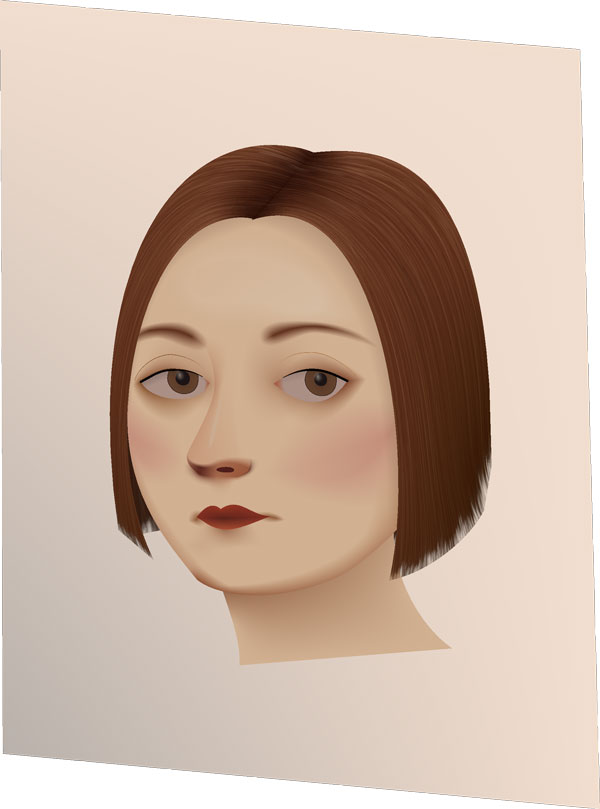
Portrait based on Lola Montez by Josef Heigel

Now that I can do texture mapping and transparency gradients, it's now so much easier and so much more fun to make more realistic objects in Omber, my vector drawing tool.

Friday, 3 March 2017

Transparency is Working in Omber

I have such a huge long list of features that I want to add to Omber that it's difficult to choose what to implement next. What I do is that I try to design all the art needed for Omber in Omber itself. If I encounter a missing feature that I need for that art, I can then prioritize working on that feature. The current feature that I'm working on is support for transparency and alpha channels.

Android icons are supposed to have a drop-shadow behind them. A drop-shadow is a semi-transparent shadow that blurs to fully transparent at the edges. When I was making Android icons for Android, I found no way to add a drop-shadow to my icons using Omber, so the current Android icons don't have that visual effect in them. Although many computer art programs have a special drop-shadow tool, I find that drop-shadow tools to be fairly limited in functionality. Since Omber is designed around advanced gradients, it could support drop-shadows if I simply added support for transparency in its gradients. Unlike a more basic drop-shadow tool, you have full control over the shape, size, and opacity of the drop-shadows you create. So for the past few weeks, I've been adding support for transparency to Omber.

Today, I've finally gotten basic transparency support working, and it seems to work well. I'm hoping to be able to release it for public use in a week. While implementing transparency, I also had to re-architect large parts of the Omber's internals. With this re-architecting, I should be able to quickly add support for other features like textured shapes as well, so that will be the next feature I add after transparency.

Omber Transparency

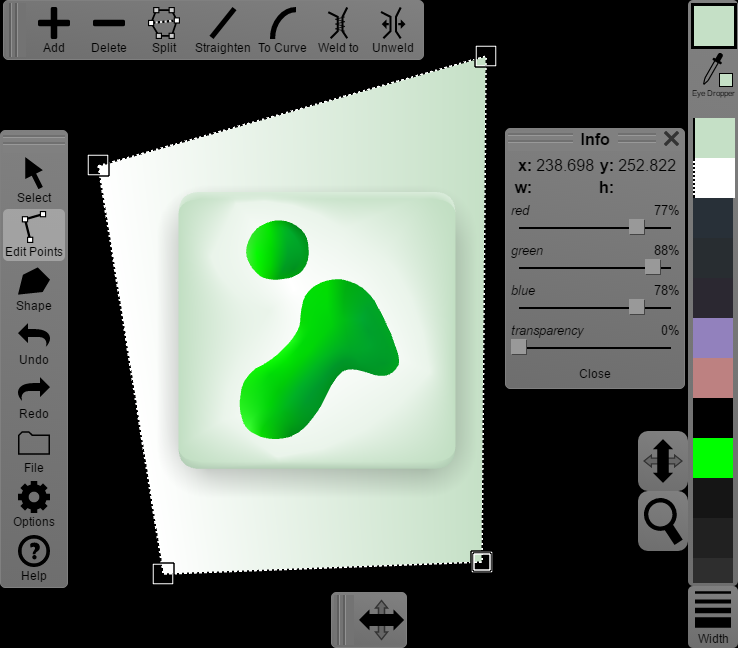
I have transparency working in Omber! Look at that drop-shadow and the faded edge highlights at the top and bottom of the icon.